
The Liquid Technologies blog offers software developers clear guidance on XML, JSON, and data integration techniques. We share insights into the latest developments in our tools – Liquid Studio, Liquid Data Mapper, Liquid XML Data Binder and Liquid XML Objects – and provide straightforward instructions for applying them to your projects. Our goal is to equip you with useful, actionable information.
-

Liquid XML 2015 Now Available
Liquid XML 2015 has been launched, featuring enhancements and new tools based on user requests. Key additions include the Liquid XML Studio – Editor Edition, a Data Mapper, a JSON Text Editor, and XML Data Binder support for WSDL and Xamarin. It’s a free upgrade for eligible users.
-
Liquid XML 2015 BETA
Liquid Studio 2015 BETA is now available for download at Liquid Technologies’ website.
-

CDATA processing in XML Data Binding
The default behavior for processing CDATA is to remove the CDATA tags, allowing for easier display and usage of the contained values. To retain the tags, set StripCDATA to false in the XmlSerializationContext, though you’ll need to handle tag removal manually for presentation. This applies to both simple and extended string elements.
-
Error E2001 – The schema does not contain any ‘elements’ so will not generate any classes
Error E2001 in the Liquid XML Data Binder indicates that a schema lacks elements, preventing the generation of C#, C++, Java, VB .Net, or Visual Basic 6 classes. To resolve this, define elements within the schema, as they are necessary for class generation and valid XML document validation.
-
Element vs complexType
In XML schema design, an element must be defined when an XML document requires it, ensuring its validity. Use complexType when the structure can be reused or is complex. It’s best to distinguish between types and elements for clarity, adhering to best practices for reusable components and attributes like “nillable.”
-
20% Summer Discount for Liquid XML 2014
Buy Liquid XML 2014 NOW and enjoy a 20% Discount Use Shopping Cart Discount Code: SUMMER20 See Online Shop for full details
-
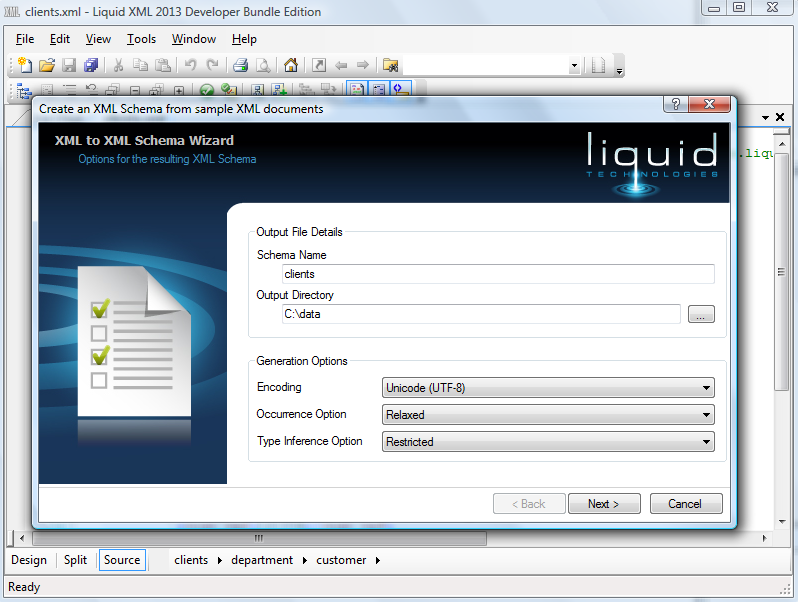
How to create XML Schema from XML Documents
Liquid XML Studio offers a user-friendly Wizard to create XML Schema (XSD) directly from XML documents. This tool simplifies the process of defining validation rules for XML, enhancing accuracy and saving time. Users can define schema names, add sample XML, and validate documents, improving the reliability of the schema.
-
Default Proxy Settings for Large Rollouts
Liquid XML 2014 version 12.2.1 introduces Default Proxy Settings for easier deployment during large rollouts. This update is available as a free upgrade for all 2014 license holders and users subscribed to the Upgrade Support Protection Plan (USPP). More details can be found in the Knowledge Base article provided.
-
XML Editor Software Update 2 Performance and Stability Release
Liquid XML Studio 2014 has released Update 2, enhancing performance and stability for editing XML, XSD, and WSDL documents. Improvements include faster load times, better validation, enhanced progress monitoring, command line support, and various fixes. This update is free for 2014 license holders and those with an active Upgrade Support Protection Plan.
-
Opening Large XML Documents
The Liquid XML Editor can handle XML documents of any size without limits. Features adjust based on file size: under 2 MB allows full features, while over 15 MB switches to the Large File Editor. This specialized editor, functional for files over 2 GB, has limited functionality but supports document formatting and validation.
-
Recent Liquid XML 2014 Fixes
The post outlines updates for Liquid XML Studio, detailing three version releases with fixes related to XML and XSD validation, Schema handling, and Group definitions. It encourages users to check for updates and access downloads from the website while offering support for any issues encountered.
-
Liquid XML 2014 – Update 1
Liquid XML 2014 – Update 1 features performance enhancements for the XML Editor and fixes for the Liquid Runtime across C++, Java, .Net, and COM. This update is available for free to all 2014 license holders and users with an active Upgrade Support Protection Plan (USPP). Download the XML Editor now.