

The Liquid Data Mapper makes building complex data transformations quick and easy, but before you start there are a few basic concepts you need to learn.
Aggregate Functions
You can use the Liquid Data Mapper to calculate aggregate functions such as Sum, Min, Max, Average, Count, etc.
The functions operate within a context, and all input values found within this context are included within the calculation.
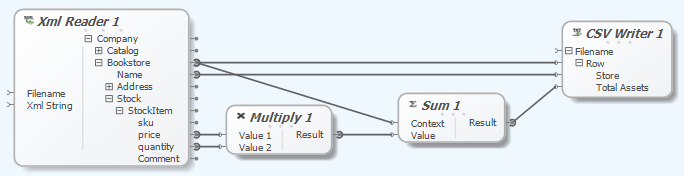 |
| Liquid Data Mapper – Aggregate Functions |
In this example we are using each BookStore as a Context, so the ‘Sum’ aggregation function will operate on each BookStore element. The value being summed is calculated by multiplying the price by the quantity for each StockItem.
Our sample data contains three bookstores so we will get three sets of results:
Chester,1426.31
London,730.17
Leeds,423.49
Changing Context
If we now change the mapping so XmlReader.Company is connected to the Sum.Context, the ‘Sum’ aggregation function is now operating on all of the items in all of the Bookstores in the Company, so we only get one total value output against each Bookstore line item.
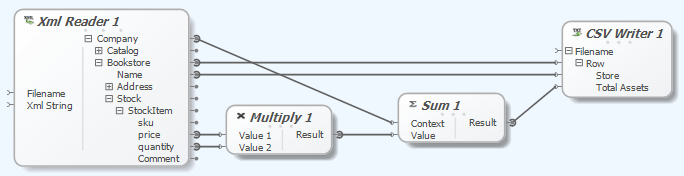 |
| Liquid Data Mapper – Aggregate Functions |
Now our sample returns a total result for every Bookstore:
Chester,2579.97
London,2579.97
Leeds,2579.97
This is probably not we want as our output, so we need to change the CSV Writer.Row context from XmlReader.Bookstore to XmlReader.Company. We will also add a Constant value to CSV Writer.Store with a value ‘All Stores Total’.
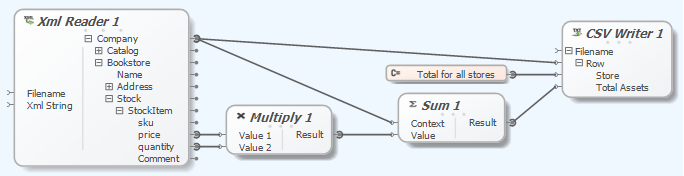 |
| Liquid Data Mapper – Aggregate Functions |
Now our sample returns a total result for every Bookstore with one value:
Total for all stores,2579.97
Tip: Execute the transform by pressing Shift-F5.Debug the transform by pressing F5 to start the debugger
F11 – Step Into
F9 – Set break point
F5 – Run (stops on break points)
A free trial of the Liquid Data Mapper is available from:
https://www.liquid-technologies.com/trial-download