
The Liquid Data Mapper makes building complex data transformations quick and easy, but before you start there are a few basic concepts you need to learn.
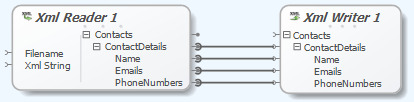
Copying Data
In this this example we will show how to read data from a source file and copy it to the output target file.
The data source will be an XML file based on the same root element as the destination:
 |
| Liquid Data Mapper – Copying Data |
Copying Data Recursively
When you are working with complex data copying every value can be a lot of work. When the source and destination types are the same you can use the ‘Copy Recursively’ function.
You can change a connector to ‘Copy Recursively’ by right clicking on it and all subsequent matching child items will be automatically connected:
 |
| Liquid Data Mapper – Copying Data Recursively |
Both samples show XML data being used to create an XML document, when you run either transform you will see the resulting XML document:
<!–Created by Liquid Data Mapper Libraries (www.liquid-technologies.com) –>
<Contacts>
<ContactDetails>
<Name>Aleshia Tomkiewicz</Name>
<PhoneNumbers>01835-703597</PhoneNumbers>
</ContactDetails>
<ContactDetails>
<Name>Evan Zigomalas</Name>
<PhoneNumbers>01937-864715 , 01714-737668</PhoneNumbers>
</ContactDetails>
<ContactDetails>
<Name>France Andrade</Name>
<PhoneNumbers>01347-368222</PhoneNumbers>
</ContactDetails>
<ContactDetails>
<Name>Ulysses Mcwalters</Name>
<PhoneNumbers>01912-771311 , 01302-601380</PhoneNumbers>
</ContactDetails>
… etc …
</Contacts>
Tip: You can execute a transform by pressing Shift-F5.
A free trial of the Liquid Data Mapper is available from:
https://www.liquid-technologies.com/trial-download