
Liquid Studio 2017 Data Mapper provides new EDI Data Source and EDI Data Target components. Scenarios where this is useful include:
- Transform EDI data between different EDI versions.
- Extract data from an EDI document.
- Creating a new EDI document.
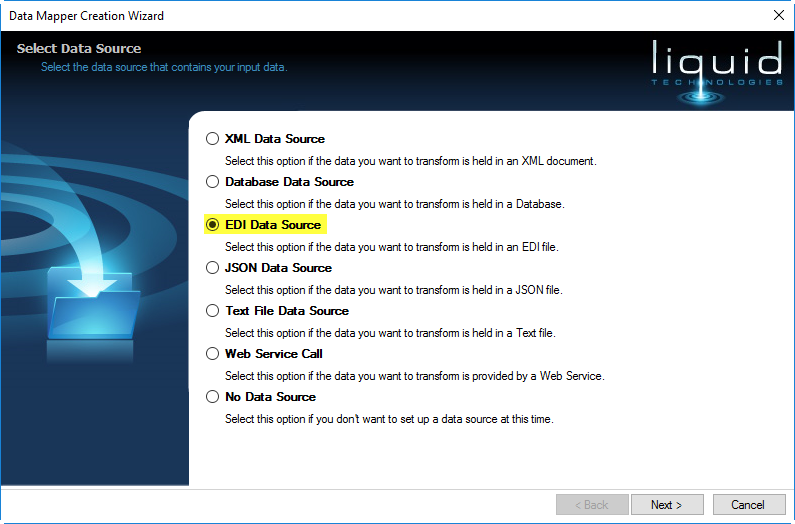
Running the Data Mapper Creation Wizard allows you to select the EDI Data Source.
 |
| Select the EDI Data Source option |
The following page then allows you to select the version and EDIFACT or X12 schema you wish to use.
 |
| Select the EDIFACT Version and Schema |
The final page allows you to select the options used to parse the EDI documents.
 |
| EDI Data Source Options |
The Data Mapper Creation Wizard also allows you to select the EDI Data Target.
 |
| Select the EDI Data Target option |
You can again select the EDIFACT or X12 schema you require along with the options used to write the EDI documents.
 |
| EDI Data Target options |
You will then see EDI Reader and EDI Writer components are added to your Liquid Data Mapper canvas. You can now start to map the fields, adding transformation components as required.
E.g. The following shows a simple Upper component which will convert the incoming data to upper case:
 |
| EDI Data Transformation |
Many other components are available to transform your data. These can be seen in the Component Palette, and are grouped into various categories.
 |
| Liquid Studio 2017 – Data Mapper Component Palette |
Data Sources and Targets:
- Database, EDI, JSON, Text File, XML, Web Service
Transformation Components:
- Values
- Constant Value
- Input Parameter
- Aggregate
- Average
- Count
- Max
- Min
- Sum
- Comparator
- Equal
- Greater Than
- Greater Than or Equal
- Less Than
- Less Than or Equal
- Not Equal
- Date Time
- Create Date
- Create Date Time
- Create Time
- Day
- Hour
- Millisecond
- Minute
- Month
- Now
- Second
- Today
- Year
- File
- Combine Path
- Get Directory Name
- Get Extension
- Get Filename
- List Files
- Resolve Path
- Logic
- And
- False
- Not
- Or
- True
- Maths
- Abs
- Add
- Divide
- Is Even
- Is Odd
- Modulus
- Multiply
- Subtract
- Misc
- Annotation
- Lookup
- Set
- Combine
- Distinct
- Filter
- First
- Get At
- Last
- Position
- Sort
- Top
- String
- Char To Code
- Code To Char
- Concat
- Empty To Null
- Index Of
- Join String
- Left
- Length
- Lower
- Replace
- Right
- Split String
- Sub String
- Trim
- Trim End
- Trim Start
- Upper
- Type
- Cast
- Default If Null
- Is Null
- Node Name
- Node Type
You can download a free trial of the Liquid Studio 2017 – Data Mapper and test out the EDI data transformation functionality for yourself:
https://www.liquid-technologies.com/trial-download