
The Liquid Technologies blog offers software developers clear guidance on XML, JSON, and data integration techniques. We share insights into the latest developments in our tools – Liquid Studio, Liquid Data Mapper, Liquid XML Data Binder and Liquid XML Objects – and provide straightforward instructions for applying them to your projects. Our goal is to equip you with useful, actionable information.
-

Announcing Liquid Studio 2018 (v16.1) – Update 1
Liquid Technologies has released Liquid Studio 2018 Update 1 and Liquid XML Data Binder 2018 Update 1, featuring new JSON support for C++, .Net, and Java, enhanced error reporting, and improvements in Data Mapper components. These updates enhance performance and are free for users with an Upgrade Support Protection Plan.
-
XML Standards Schema Library Updates
New XML Standards added to the XML Schema Library include FpML 5.9, a protocol for complex financial products, featuring various schemas for confirmation, legal, pretrade, record keeping, reporting, and transparency. Additionally, Membrane Service Proxy 1.4.1 offers a Java-based framework for REST and SOAP APIs. Suggestions for new standards are welcome.
-
Liquid Studio 2018 BETA
Liquid Studio 2018 BETA is now available for download at Liquid Technologies’ website.
-
Data Mapper – Generate an Executable (.exe) File
This video tutorial demonstrates the process of creating an executable (.exe) file that performs a data transformation to convert a CSV file into an XML document using Liquid Data Mapper 2017.
-

Data Mapper – Generate a C# Data Mapping Project
This video tutorial demonstrates generating a C# data transform in Visual Studio to convert a CSV file into an XML document using Liquid Data Mapper 2017.
-

Data Mapper – Convert CSV to XML
This video tutorial demonstrates the process of creating a data transform to convert a CSV file into an XML document using Liquid Data Mapper 2017.
-

Data Mapper – Copying Data Video
This video demonstrates how to use Liquid Data Mapper for basic data transfer between a source and target. It provides a straightforward tutorial on creating a simple transform.
-

Data Mapper – First Transform Video
This video tutorial demonstrates creating a straightforward data transformation from constant values to an XML document using an XML Schema (XSD).
-

Liquid Data Mapper – Contexts
The Liquid Data Mapper simplifies complex data transformations, focusing on the concept of contexts. By examining the transform in detail, users learn how it generates a CSV file with ‘Store’ and ‘Total Assets’ columns from XmlReader.Bookstore entries. The process involves various calculations like Sum and Multiply, with debugging tips provided.
-
Liquid Data Mapper – Sub Functions
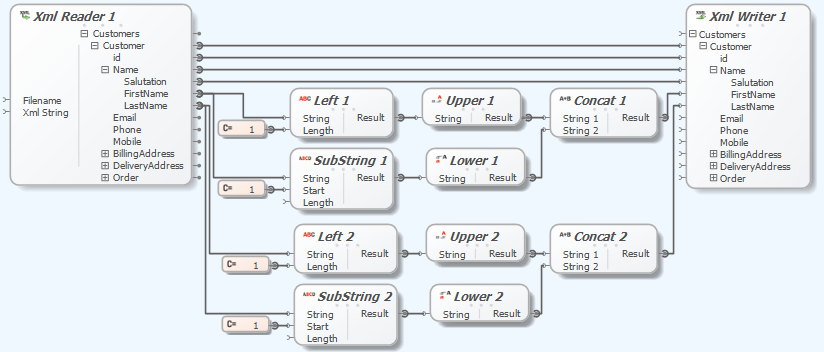
The Liquid Data Mapper simplifies complex data transformations, emphasizing the importance of Custom Sub Functions for maintainability and readability. An example illustrates transforming customer names by capitalizing the first letter. Sub Functions streamline the process, allowing reuse to enhance clarity.
-

Liquid Data Mapper – Dynamic Data Sources
The Liquid Data Mapper simplifies complex data transformations, enabling runtime loading of data sources like XML, JSON, CSV, and EDI documents. Users can dynamically combine files, as shown with XML examples where contents are merged.
-
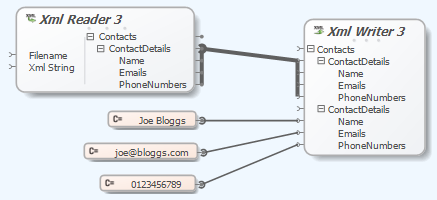
Liquid Data Mapper – Duplicating Nodes
The Liquid Data Mapper simplifies complex data transformations by allowing users to connect multiple data sources. Users can duplicate nodes to merge data from various sources, such as XML files or constant values. This functionality enables efficient data integration, with a user-friendly diagram interface and debugging options for troubleshooting.