
The Liquid Technologies blog offers software developers clear guidance on XML, JSON, and data integration techniques. We share insights into the latest developments in our tools – Liquid Studio, Liquid Data Mapper, Liquid XML Data Binder and Liquid XML Objects – and provide straightforward instructions for applying them to your projects. Our goal is to equip you with useful, actionable information.
-

Liquid Data Mapper – Scalar Components
The Liquid Data Mapper facilitates complex data transformations by utilizing scalar components, which process single primitive values from sequences. Each scalar function can convert inputs sequentially, returning transformed values. Examples illustrate how components like ‘Upper’ and ‘Left’ work, producing evaluated sequences.
-

Liquid Data Mapper – Sequences
The Liquid Data Mapper enables efficient data transformations, utilizing sequences of values. Each connection point returns a sequence, even if it contains a single value or is empty. Examples illustrate how constant components generate sequences, which can be combined to create multiple elements in XML.
-

Liquid Data Mapper – Aggregate Functions
The Liquid Data Mapper simplifies complex data transformations by utilizing aggregate functions like Sum, Min, Max, Average, and Count. Each function operates within a specified context, allowing users to customize calculations based on datasets like BookStores. Adjusting contexts can change output, ensuring accurate totals for individual or combined stores.
-
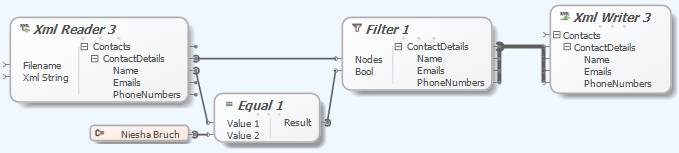
Liquid Data Mapper – Filtering Data
The Liquid Data Mapper facilitates quick and easy data transformations. It requires understanding basic concepts like filtering data, which uses a Boolean value to accept or reject nodes. An example demonstrates filtering XML data to create a new document with specific content.
-

Liquid Data Mapper – Sorting Data
The Liquid Data Mapper simplifies complex data transformations, starting with essential concepts like sorting data. Users can sort ContactDetails by name using ‘order by’ criteria in an XML source, dynamically determining output through input nodes.
-

Liquid Data Mapper – Data Manipulation
The Liquid Data Mapper simplifies complex data transformations. Users learn to read data from a source file, transform it, and write to a target file while converting ‘Name’ fields to uppercase. A drag-and-drop interface allows for easy manipulation, using XML data as an example.
-

Liquid Data Mapper – First Transform
The Liquid Data Mapper simplifies complex data transformations by requiring users to configure a target component from the Component Palette. Supported targets include databases, EDI, JSON, text files, web services, and XML. A simple example demonstrates generating an XML document.
-
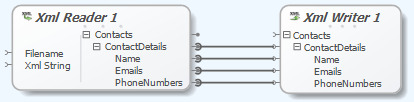
Liquid Data Mapper – Copying Data
The Liquid Data Mapper simplifies complex data transformations. Users can easily copy data from an XML source file to a target file. The ‘Copy Recursively’ function connects matching child items automatically, streamlining repetitive tasks.
-
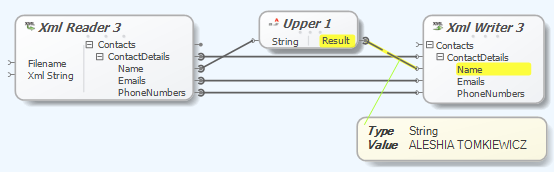
Liquid Data Mapper – Debugging Transforms
The Liquid Data Mapper simplifies complex data transformations, but understanding basic concepts is essential. The step-by-step debugger allows users to identify issues during transformation processes, with functionalities like breakpoints (F9), running (F5), and stepping through (F11) for efficient debugging.
-

New JSON and XML Tools With Liquid Studio Update 1
Liquid Technologies announced the release of Liquid Studio 2017 – Update 1, enhancing productivity for JSON and XML developers. Key features include Visual Studio 2017 support, JSON Schema Editor extension, and conversion tools for JSON and XML Schema. This update is free for existing users, reflecting a commitment to ongoing product improvement.
-
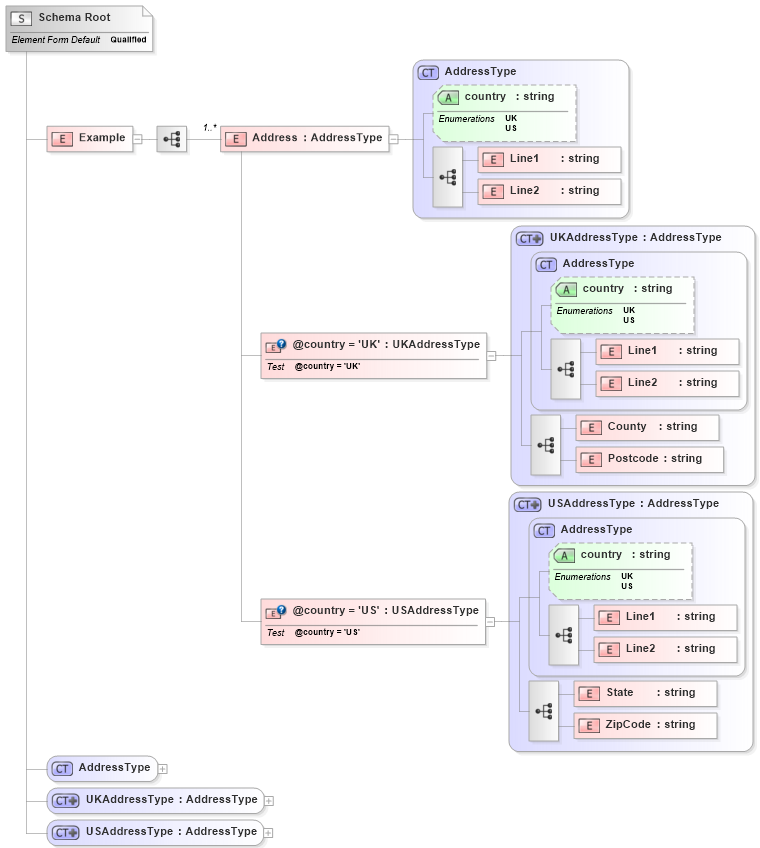
What’s new in XSD 1.1
The XSD 1.1 standard improves upon XSD 1.0 by introducing features for better validation and extensibility, such as xs:alternative for value-driven typing and xs:assert for cross-field validation using XPath. It remains compatible with XSD 1.0, allowing existing schemas to work seamlessly without upgrades. Enhanced capabilities support complex business rules effectively.
-
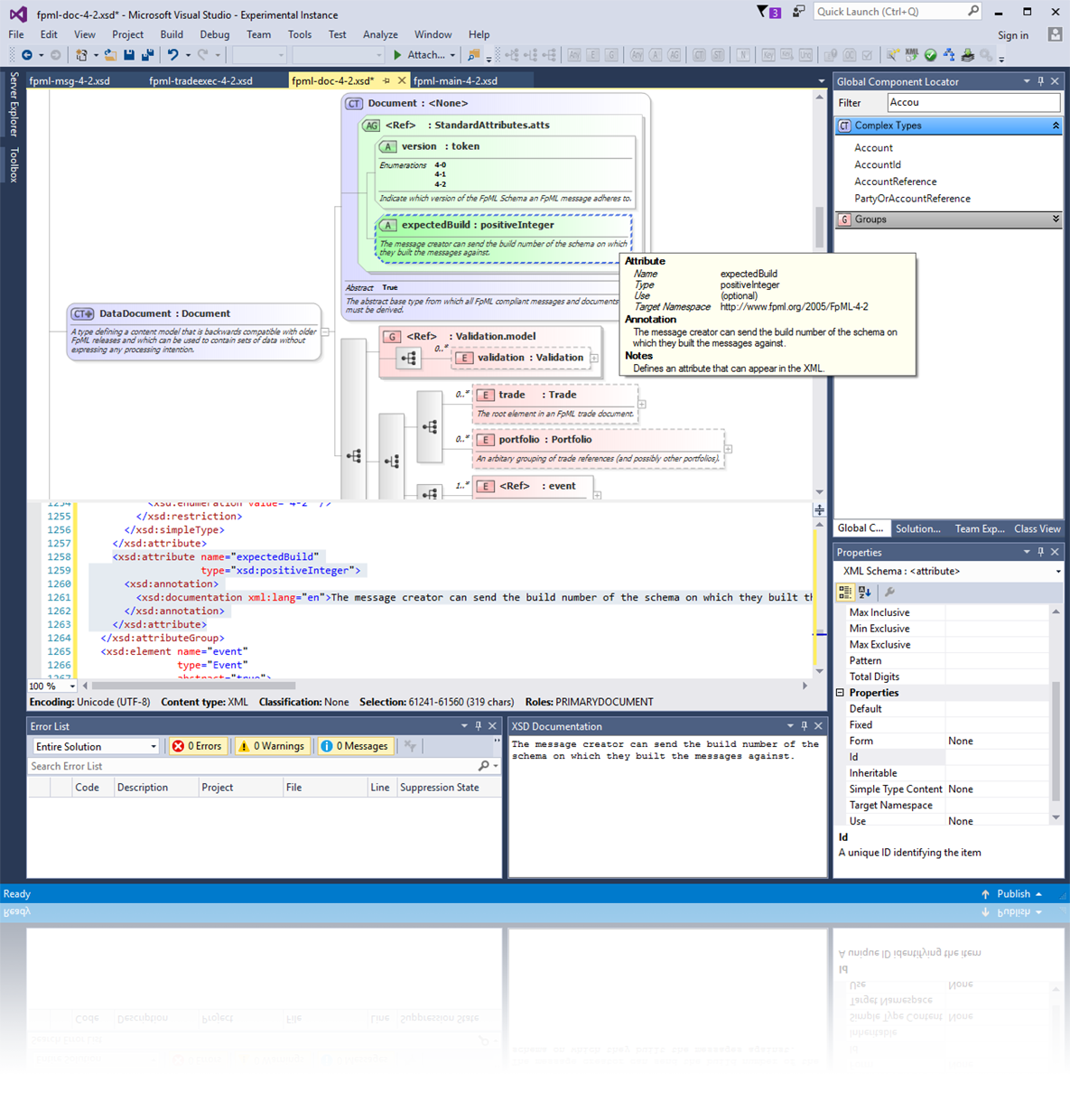
Extend Microsoft Visual Studio 2017 With Liquid Technologies XML and Web Services Tools
Liquid Technologies announced its support for Microsoft Visual Studio 2017, enhancing productivity for XML and Web Service developers. Their tools, improved over more than a decade, include graphical editors, a documentation generator, and a Web Service Test Client. Compatibility with earlier Visual Studio versions is also maintained, ensuring extensive functionality and support.