

Welcome to part 1 of this 3 part JSON Schema tutorial series.
- Part 1 – The basic structure of a JSON Schema
- Part 2 – Validation rules
- Part 3 – Schema reuse and design
Ensuring Data Quality and Structure
When exchanging JSON data between systems or even within different parts of a single application, it’s vital to ensure that the data conforms to an expected structure and that its values are valid. Without a formal way to define these expectations, data inconsistencies can lead to bugs, integration issues, and maintenance headaches. JSON Schema provides this formal mechanism for describing data structures.
Why use JSON Schema?
A JSON Schema is a vocabulary that allows you to annotate, describe, and validate JSON documents. It acts as a “blueprint” or “contract” for your JSON data. Key benefits include:
- Data Validation: Ensure incoming or outgoing JSON data conforms to expected formats, types, and constraints (e.g., a userId must be an integer, an email must be a valid email format).
- Documentation: Provide clear, human-readable, and machine-readable documentation of your JSON structures.31 This is invaluable for API consumers.
- Ensuring Data Consistency: Critical when different systems, services, or teams exchange JSON data, helping to maintain a shared understanding of the data model.3
- Automated Testing: Facilitate the generation of tests for API endpoints by defining expected request and response payloads.31
- API Contract Definition: Clearly define the expected request and response structures for APIs. Some API tools use JSON Schema to dynamically generate forms or validate API calls.31
Tools that support JSON Schema, such as advanced editors and validators like those offered by Liquid Technologies in our JSON Editor, can significantly simplify the process of creating, managing, and applying these schemas, much like their established tools for XML Schema (XSD).
JSON Schema by example
Lets look at a simple JSON Schema and break down the concepts.
Using the Liquid Studio JSON Schema editor we can view a graphical representation of the schema, which makes understanding it a bit easier.

The root of a JSON schema typically looks something like this.
{
    "$schema": "https://json-schema.org/draft/2020-12/schema",
    "$id": "https://example.com/user-profile",
    "title": "User Profile",
    "description": "Schema for a user's personal profile",
    "type": "object",
    "properties": {
    ...
-
The
$schemaproperty is mandatory, this tells the reader that this is a JSON Schema. There are a number of JSON Schema draft formats, and this URI identifies the version we are using (for simplicity we are only using the latest version draft 2020-12). -
The
$idproperty typically provides a unique id that identfies the schema. Although this is not required, it is good practice to add it as it allows you to schema to be identified, it can contain version information, and can be used to assoicate JSON document with this schema. -
The
titleanddescriptionproperties. These keywords provide human-readable annotations. title gives a short description, while description can provide more detailed explanations. They do not affect validation but are very useful for documentation. -
The
typeproperty determines the type of data the JSON document can contain (for a root JSON value this is typicallyobjectorarray). -
When the value
typein the JSON document is anobjectthenpropertieslists all the properties that the object can contain."username": { "type": "string", "description": "User's chosen username", "minLength": 3 },
This defines a property called ‘username’ on the root JSON Schema object. It says it must be a string and it must be at least 3 chars long.
        "email": {
            "type": "string",
            "description": "User's email address",
            "format": "email"
        },
This defines a property called ‘email’ on the root JSON Schema object. It says it must be a string and the string must comply with the email format rules (see https://json-schema.org/draft/2020-12/json-schema-validation#section-7.2.1). The JSON Schema standards define a number of formats (i.e. date, uri, hostname etc) which validators understand and have specific rules for.
        "interests": {
            "type": "array",
            "description": "A list of topics or hobbies the user is interested in",
            "uniqueItems": true,
            "items": {
                "type": "string"
            }
        },
This defines a property called ‘interests’ on the root JSON Schema object. The type property tells us the value must be an array. The items property tells us every item in the array must be a string. The uniqueItems properties says that duplicate values are not allowed in the array.
NOTE This snippet brings in another key concept in a JSON Schema – nested schemas. The contents of items is itself a JSON Schema, and can have any of the properties described here [1].
        "socialLinks": {
            "type": "array",
            "description": "A list of the user's social media profiles",
            "items": {
                "type": "object",
                "properties": {
                    "platform": {
                        "type": "string",
                        "description": "The social media platform (e.g., 'Twitter', 'LinkedIn')",
                        "enum": [
                            "Facebook",
                            "X",
                            "Instagram",
                            "TikTok",
                            "LinkedIn"
                        ]
                    },
                    "url": {
                        "type": "string",
                        "description": "The URL to the user's profile on that platform",
                        "format": "uri"
                    }
                },
                "required": [
                    "platform",
                    "url"
                ]
            }
        }
Lets break down whats happening here. This is very similar to the intrests property, it defines a property called socialLinks which contains an array. However this time the values in the array are themselves objects, and we have a whole nested JSON Schema to describe each object in the array.
The JSON Schema for the objects in the array says the object must have 2 properties platform and url.
platformmust contain a string with one of the valuesFacebook,X,Instagram,TikTokorLinkedIn.urlmust contain a string which complies with the formatting rules for a uri.
The required property lists all the properties that must be present in every object within the socialLinks array.
    },
    "required": [
        "username",
        "email"
    ]
}
Finally the required property indicates which properties on the root object are required in the JSON instance document.
A Valid JSON document
The following is a JSON document that is valid against the schema above.
{
    "username": "music_lover",
    "email": "melodies@domain.org",
    "interests": [
        "playing guitar",
        "attending concerts",
        "music production",
        "vinyl collecting"
    ],
    "socialLinks": [
        {
            "platform": "Instagram",
            "url": "https://instagram.com/music_lover_official"
        },
        {
            "platform": "TikTok",
            "url": "https://tiktok.com/@music_lover_vibes"
        }
    ]
}
Whats not in the JSON Schema
We have just dissected the contents of the JSON Schema. The properties that are missing from the JSON Schema have almost as much impact as the ones explicitly in the JSON Schema. The absence of certain properties has quite an impact.
In particular the type, items and additionalProperties.
We will look at additionalProperties (more about the other properties in Part 2). The sample below defines an object with 2 properties ID and Name.
"MyProperty": {
    "type": "object",
    "properties": {
        "ID":   { "type": "integer" },
        "Name": { "type": "string" }
    }
}
As expected, this defines an object with the properties ID and Name, however it also allows you to add any other property you like to it.
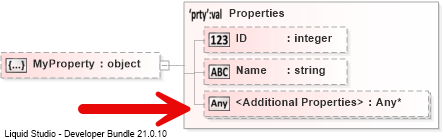
This is because the additionalProperties property defaults to ‘allow anything’, if you want to explicitly prevent other properties being included then you need to add "additionalProperties": false.
"MyProperty": {
    "type": "object",
    "properties": {
        "ID":   { "type": "integer" },
        "Name": { "type": "string" }
    },
    "additionalProperties": false
}

The point being, you need to be explicit with some of the properties in your JSON Schema otherwise you will end up with very loose definitions. This could lead to runtime errors that could easily have been caught in the message validation code.
Summary
In Part 1 we have examined a simple JSON Schema, this should have provided a rough idea of what goes into it and its structure. In Part 2 we will look the validation rules in more detail
The properties
$schemaanddefinitionscan only be used in the root schema.↩ ↩︎