

Welcome to part 2 of this 3 part JSON Schema tutorial series.
- Part 1 – The basic structure of a JSON Schema
- Part 2 – Validation rules
- Part 3 – Schema reuse and design
In part 1 we examined the structure of a JSON Schema, in this part we will look at validation rules.
Before we start lets have another look at the structure of a JSON Schema. Its important to appreciate that a JSON Schema is a nested tree of JSON Schemas. So every value is itself described by a JSON Schema.
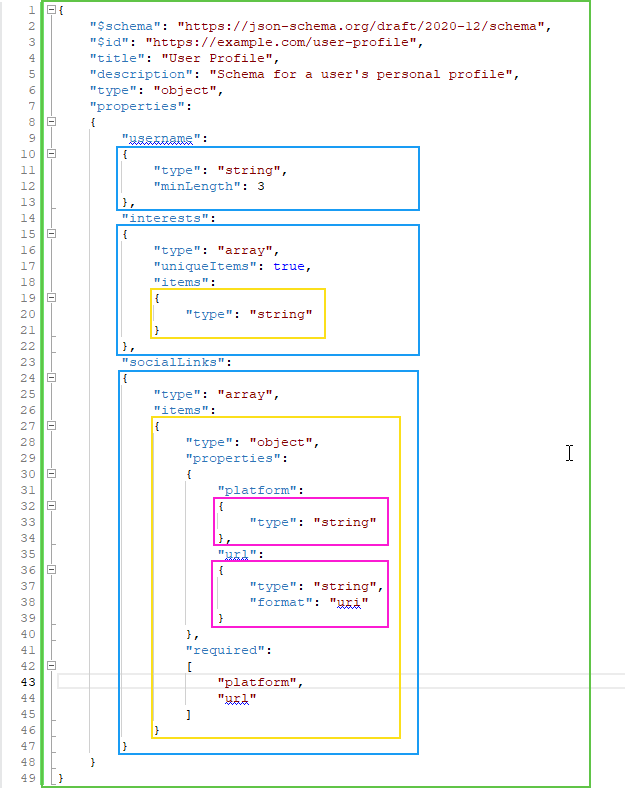
Each JSON Schema in the code has been highlighted, as you can see everywhere a value is described we have a JSON Schema.
Terms:
- ‘JSON Schema’ is the document describing your data.
- ‘JSON Instance’ is the JSON data being validated by the ‘JSON Schema’.
The type Property
The type property specifies the fundamental JSON data type(s) that a JSON Instance value must conform to.
Only a limited number of types are supported in JSON
array: the JSON instance value can be an array of JSON values, i.e."items":[ "item1", 4, "item3, false, "item5" ]boolean: the JSON instance value can be the literaltrueorfalse. i.e."enabled":trueinteger: the JSON instance value can be an integer value, i.e."age":35null: the JSON instance value can benull, i.e."age":nullnumber: the JSON instance value can be an number, either an integer of decimal value, exponent notation is allowed. i.e."age":35or"price":35.45or"distance":4.5541e12object: the JSON instance value can be a JSON object. A JSON object contains 0-n properties i.e."Person": { "Name":"Fred", "age":34" }string: the JSON instance value can be a string value. See JSON Tutorial Part 2 for details of escaping special characters. i.e."Name":"Fred"
The value of the type property can either be string, an array of strings, or the property can be omitted.
- A string value: It must be ONE of the types listed above i.e.
"type":"number". In this case the JSON Instance value must be of the type declared. - An array of string values: An array containing 0-n of the types listed above i.e.
"type":["number", "null"]. In this case the JSON Instance value must be one of the types declared. i.e.'"MyValue":4or'"MyValue":null - The property is omitted: If the
typeproperty is missing the default value is an array of all the types. The result being the JSON Instance value can be ANY type.
NOTE Omitting the type property means ‘any type’ is allowed, while this can be useful, its typically not what you want.
Normally you know what the type should be, it makes no sense for a surname to be a number, its always a string. So be specific its good practice to always add the type property, it also improves the output from 3rd part tools – form builders, documentation generation, code generators etc, as they don’t have to cater for data in multiple formats.
Nested JSON Schemas
Anywhere that we can define a JSON Schema, for example in items we can also use the some special literal values
{}an empty schema definition. The default value of all the properties effectively make this mean ‘allow anything’, i.e. a schema with no constraints at all.truethis means the same as{}– so ‘allow everything’.falsethis means the inverse of{}– so ‘deny everything’.- not set. Different properties have different defaults, however they all default to provide the minimum validation so typically they default to
{}– ‘allow everything’.
Rules for Arrays
The content of an array is determined by the properties items and prefixItems.
prefixItems is an array of JSON Schemas. Each JSON schema in the array describes the JSON value at the equivalent index in the JSON Instance array.
items is a JSON Schema that describes all the JSON array instance values after the ones defined by prefixItems. If prefixItems is ommited or empty then items describes all the values in the JSON Instance array.
In this Example the array must contain an integer, a boolean, and 0-n strings.
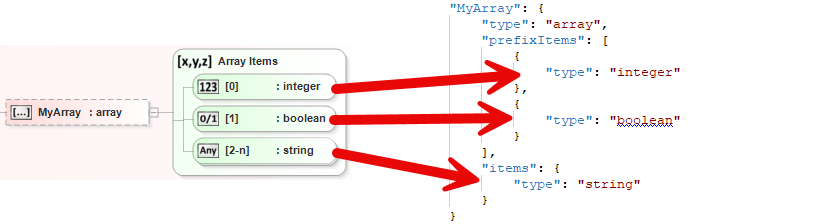
So the following would be valid
[ 34, true, "stuff" ]
[ 34, true ]
[ 34, true, "Other", "Stuff" ]
[ 34 ]
This would not be valid
[ 34, 45, "stuff" ]
You will notice the [ 34 ] is valid this may seem odd, but only items that exist in the JSON Instance array are evaluated against there corresponding JSON Schema index, so if they are not there, they are not checked. If you want to enforce that they are present in the array then you can add "minItems":2 to the array JSON Schema.
Additional Array Constraints
minItems: A non-negative integer. The JSON Instance array must have at least this many items.maxItems: A non-negative integer. The JSON Instance array must have at most this many items.uniqueItems: A boolean. If true, all items in the JSON Instance array must be unique. That is, no two items in the array can be structurally equal according to the JSON Schema equality rules.contains: A subschema. The JSON Instance array is valid if at least one of its items validates against this subschema.minContains: A non-negative integer. Used in conjunction withcontains. The JSON Instance array must contain at least this many items that validate against the contains subschema. If contains is not present, this keyword has no effect.maxContains: A non-negative integer. Used in conjunction withcontains. The JSON Instance array must contain at most this many items that validate against the contains subschema. If contains is not present, this keyword has no effect.
Rules for Objects
Typically properties and required are enough to describe all the properties on a JSON object, but there are more advanced options.
additionalProperties makes it possible to allow properties in the JSON instance object that you did not define in the JSON Schema. By default additionalProperties is {} that is to say it allows anything. So by default a JSON instance object can contain any properties, with anything in them.
If you explicitly provided definitions in properties or patternProperties (more about these in a minute) then these rules will be applied in preference to the rules in additionalProperties.
If you want your JSON instance object to just contain properties that you have explicitly defined then you can set "additionalProperties":false meaning properties that are not explicitly defined in properties or patternProperties are not allowed.
Note If you don’t want to allow ‘unknown’ properties in you JSON instance objects then setting "additionalProperties":false is a good idea – but it closes the door on 3rd party extensibility.
Additionally you can have patternProperties, these are almost identical to properties, except the name of the pattern property is a regular expression that describes its name in the JSON instance object.
So if you have an object where all the properties must start “user_id_XXXX” then you could create a pattern property to enforce this with a pattern property like this
"patternProperties": {
    "user_id_[a-z]+": {
        "type": "string"
    }
},
Which would ensure properties that looked something like this
{
    "user_id_fred": "...",
    "user_id_james": "..."
}
propertyNames contains a JSON schema that describes the values of the property names themselves (it does not validate the values of the properties).
We talked a little about required in Part 1, and possibly gave the impression that it had to contain properties defined in properties.
However its more flexible than that, you can name properties here that are valid according to properties, patternProperties or additionalProperties i.e. "required":["email", "user_id_unknown", "some_additional_property_name_i_just_made_up"].
Additional Property Constraints
minProperties: A non-negative integer. The JSON Instance object must have at least this many properties.maxProperties: A non-negative integer. The JSON Instance object must have at most this many properties.dependentRequired: An object where each key is a property name and each value is an array of strings. If the property is present in the JSON Instance object, then all properties listed in the array value must also be present in the JSON Instance object[1].dependentSchemas: An object where each key is a property name and each value is a JSON Schema. If the property is present in the JSON Instance object, then the JSON Instance object must validate against the associated subschema[1:1].
Rules for Strings
These rules only apply when the JSON Instance value is a string.
minLength: This property specifies the minimum allowed length of the string. The string’s length is measured in Unicode code points. If the string’s length is less than the value of minLength, the validation fails.maxLength: This property specifies the maximum allowed length of the string. Similar to minLength, the length is measured in Unicode code points. If the string’s length exceeds the value of maxLength, the validation fails.pattern: This property defines a regular expression that the string value must match. The string is considered valid only if it fully matches the provided regular expression. The regular expression syntax used is that of ECMA 262 (JavaScript).format: This property provides a semantic identifier that suggests a specific meaning or purpose for the string value, such as “date-time”, “email”, or “uri”. While format is an annotation keyword (meaning it doesn’t require validation by default), validators are encouraged to enforce stricter validation rules for recognized formats, providing more specific type checking beyond basic string validation.contentEncoding: This property indicates how the string’s content was encoded. It specifies a content encoding such as “base64” or “quoted-printable”. This is particularly useful when the string represents binary data that has been encoded for inclusion within a JSON document.contentMediaType: This property specifies the media type (MIME type) of the string’s content after any contentEncoding has been applied. For example, if a string is base64-encoded and represents a PNG image, contentMediaType would be “image/png”. This allows for validation tools to potentially decode the string and then validate its content against the specified media type.contentSchema: This property provides a subschema that can be used to validate the decoded content of the string. It is used in conjunction with contentEncoding and contentMediaType. After the string’s content has been decoded according to contentEncoding and identified by contentMediaType, contentSchema can be applied to further validate the structure or properties of that decoded content. For instance, if a string contains a base64-encoded JSON object, contentSchema could be a schema for that embedded JSON object.
Rules for integers and numbers
JSON schemas support 2 types of number formats, number which includes both integers and floating-point numbers, and integer which is just integer values.
Note number does not support any literals to represent +/- INFINITY or Not a Number (NaN).
These rules only apply when the JSON Instance value is a number or integer.
multipleOf: Value must be a number strictly greater than 0. A numeric JSON Instance value is valid only if division by this keyword’s value results in an integer. This means the JSON Instance value must be a multiple of the multipleOf value.maximum: Value must be a number. Defines an inclusive upper limit. The JSON Instance value is valid if it is less than or exactly equal to maximum.exclusiveMaximum: Value must be a number. Defines an exclusive upper limit. The JSON Instance value is valid only if it is strictly less than exclusiveMaximum (not equal to).minimum: Value must be a number. Defines an inclusive lower limit. The JSON Instance value is valid if it is greater than or exactly equal to minimum.exclusiveMinimum: Value must be a number. Defines an exclusive lower limit. The JSON Instance value is valid only if it is strictly greater than exclusiveMinimum (not equal to).
Other Validation Rules
These properties apply to all data types
enum: Defines a fixed set of allowed values for a JSON Instance value. The JSON Instance value must be exactly equal to one of the values listed in theenumarray. The values in the array can be of any JSON type.const: Specifies that a JSON Instance value must be exactly equal to a single, specific value. This is functionally equivalent to usingenumwith only one value.
Annotaions
The following properties have no impact on validation, but help the JSON Schema author and users understand the structure of the document, and provide information for other tools when they process the JSON Schema (i.e. code generators, documentation generators etc.)
title: Provides a short, human-readable title or name for the schema or subschema. This is an annotation and does not affect validation.description: Offers a more detailed explanation of the schema’s purpose or the data it describes. Liketitle, it’s an annotation.comment: Allows schema authors to include comments directly within the schema. These comments are ignored by validators and are purely for human readability (Remember JSON does not support comments in the code, so we need a specific property for them).examples: An array containing one or more example valid instances that conform to the schema. This is an annotation for documentation purposes.default: Suggests a default value for the instance. This is an annotation and does not perform validation; it’s a hint for user interfaces or data processing.readOnly: An annotation indicating that the value of the instance is not intended to be modified by a user interface.writeOnly: An annotation indicating that the value of the instance is not intended to be displayed by a user interface.
Conditional Logic
The following properties make it possible to implement advanced validation scenarios.
not: The value is a JSON Schema object. The JSON Instance value must not validate against the JSON Schema. If the JSON Instance value validates against the JSON Schema defined bynot, then the overall validation fails.allOf: The value is an Array of JSON Schemas. Requires a JSON Instance value to validate successfully against all of the subschemas listed in its array value. Defaults to[]which means NOT{}so by default it validates.anyOf: The value is an Array of JSON Schemas. Requires a JSON Instance value to validate successfully against at least one of the subschemas listed in its array value.oneOf: The value is an Array of JSON Schemas. Requires a JSON Instance value to validate successfully against exactly one of the subschemas listed in its array value.if/then/else: The value of each property is a JSON Schema. Enables conditional schema application. If a JSON Instance value validates against the schema specified byif, it must also validate against the schema inthen. Otherwise, if anelseschema is present, the JSON Instance value must validate against that.
If a property is omitted it is ignored.
Summary
In Part 2 we have reviewed all the validation properties that can be used to validate a JSON Instance document. In Part 3 we will look a the best way to design and structure a JSON Schema in order to make re-usable definitions, add version control, and add or restrict extensibility.
dependencieswas replaced bydependentRequiredanddependentSchemasin version Draft 2019-09. ↩︎ ↩︎